

Main Types of Iwill Mini PCs
IWILL has been deeply involved in the mini computer industry for 15 years and has developed more than 90 products. These mini computers include both fan-equipped and fanless models. They can be broadly categorized based on their processors into low-power Celeron and high-performance Core processors.
Celeron Processors:
● J1900
● J3710
● J4125
● J6412
● N100
01
Core Processors:
● Intel Core i3
● Intel Core i5
● Intel Core i7
02
CPU Generations:
● 8th
● 10th
● 12th
● 14th
03
Installable system:
● Win 10
● win 11
● linux
04
-

Firewall Mini PC 2 SFP+ 10GB
Features . Intel N150 4-core processor boosts to 3.6GHzFirewall Mini PC. . Single DDR5 slot Add to Inquiry -
N150 Compact Industrial Mini PC
Features . Intel Twin Lake N150 Processor (Up to 3.6GHz) Compact Industrial Mini PC. High-Speed Add to Inquiry -
Fanless Industrial Automation PC
Features . ◇ Intel® 7th/8th/10th gen Core™ processor ;. ◇ 1* M.2 2280 slot and 1*2.5 inch hard Add to Inquiry -
Rockchip RK3568 Fanless Box PC
◇ Rockchip RK3568 Fanless BOX PC. ◇ RK3568, quad-core Cortex-A55, Max 2.0GHz. ◇ Min RAM+ROM: Add to Inquiry -
Rockchip RK3588 Mini BOX PC
◇ Rockchip RK3588 ARM Mini BOX PC. ◇ 2 Gigabit Ethernet ports. ◇ Supports WiFi6) & BT V5.0. ◇ Add to Inquiry -
14th Gen Ultra Mini PC
Features:. Intel 14th Gen Core Ultra processor Micro pc . 1*DDR5 4800 Ram, Max 32 GB. 3 HDMI, 1 Add to Inquiry -
N100 Mini PC Fanless
◇ 12th gen Alder Lake-N N100 Mini PC Fanless. ◇ 1*DDR4 3200MHz memory slot,Max. 16 GB . ◇ SSD + Add to Inquiry -
High End Mini PC
Features:. Intel Core 12th Gen core i3 i5 i7 4k Mini Computer . 1*DDR5 4800 memory slot,Max. 32 GB. Add to Inquiry -
12th Gen Mini PC
Features:. 12th Gen core i3 i5 i7 processor Mini PC . 1*DDR4 3200 memory slot, Max. 32 GB. 2* Add to Inquiry -
J6412 Mini PC
◇ Fanless design J6412 mini pc. ◇ 2*Realtek 8111H 1000M Lan. ◇ 1*M.2 3052 B-key, Optional 5G . ◇ Add to Inquiry -
Small Form Factor Linux PC
◇ Intel Celeron J6412 processor small computer. ◇ 3*Intel i226-V 2.5G Lans. ◇ 1*M.2 3052 B-key, Add to Inquiry -
Ultra Compact Fanless PC
8th/10th Intel Core i3 i5 i7 processor Micro PC . 1xDDR4 memory slot, Max. 32G. 1xM.2 2280 slot, Add to Inquiry


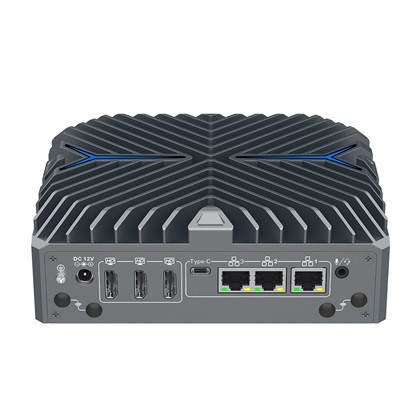


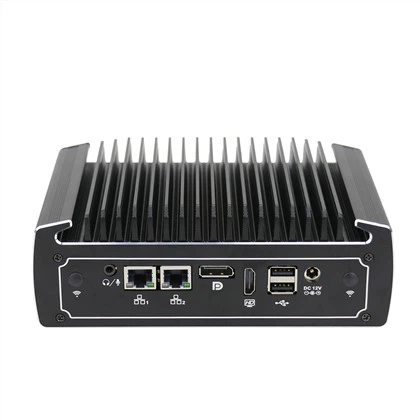
Definition of mini pc
Firstly, a mini PC, as the name "mini" suggests, refers to a computer with a very small size and weight, lighter than a traditional desktop PC, and it takes up very little desk space. Second, a mini PC is affordable and energy-efficient, with a low power TDP usually ranging between 6W and 15W.
By definition, "fanless" means there are no cooling fans. The heat generated by the CPU is absorbed by the aluminum case and dispersed into the environment through special fins, making the PC virtually inaudible.
Why Choose a Mini PC?
Small But Powerful
Mini PCs feature a fanless cooling system, are lightweight and compact, making them easy to place in crowded workstations or small spaces. You can also mount a mini PC behind a computer monitor using VESA mounting.
Expandable Capacity
Mini PCs offer a combination of RAM and SSD options:
RAM: DDR3, DDR4, DDR5; available in 4GB, 8GB, or 16GB options.
Storage: M.2, MSATA, or 2.5-inch drives; available in 64GB, 128GB, 256GB, 512GB, or 1TB options.
Operating System : Windows 10 , Windows 11 , Linux
Rich Interfaces
Mini PCs come with various interfaces, including HD-MI, VGA, and DP display ports. They typically support dual or triple monitor setups, as well as USB 2.0, USB 3.0, LAN ports, Wi-Fi, and Bl-ue-tooth. These multi-interfaces meet basic task needs.
Multiple Operating Systems
Mini PCs can run Windows 10, Windows 11, or Linux.
In general, mini PCs offer a new computing experience. They are small, efficient, and portable, allowing users to operate computers anytime and anywhere. As demand for digital products increases, the market prospects for mini PCs are expected to improve.04
Applications of Mini PCs
Mini PCs are compact, fanless, efficient in heat dissipation, and low power, making them suitable for a variety of scenarios, including:
Digital Signage
Mini PCs offer advantages over larger systems, including support for 4K video and multiple screens, making them ideal for digital signage.
Kiosks
Mini PCs are excellent for building digital kiosks due to their compact size and functionality.
Schools
Mini PCs are widely used in schools and universities. They can be employed to create digital classrooms, offering multimedia teaching resources and online learning platforms. Mini PCs are also valuable in programming and STEM education, aiding students in learning computer science and engineering. Additionally, they can function as control systems in school libraries or laboratories, supporting academic research and practical activities.
Industrial Automation Control
robot control and automated production line monitoring, mini PCs are excellent due to their compact size and low power consumption. They serve as ideal control platforms for industrial equipment. With the capability to run various industrial control software and monitoring systems, mini PCs can oversee production line status in real time, optimize production processes, and enhance production efficiency and quality.
Medical
Hospitals use mini PCs for patient care and medical staff operations. Their compact size and efficiency help reduce workspace clutter.
FAQ
Q: Are you a manufacturer?
A: Yes, we have over 15 years of R&D and manufacturing experience.
Q: Can you add our logo to the BIOS?
A: Yes, we can add your logo to the BIOS for free. Please provide us with your logo in JPG format with a resolution of 800x600.
Q: Can you configure the BIOS settings for my order, such as setting "Restore AC Power Loss" to "Power On"?
A: Yes, we can configure the BIOS settings as needed for free.
Q: Can the PC operate 24/7?
A: Yes, all of our products are designed to operate 24/7.
Q: What is the lead time for your products?
A: The lead time is 2-3 days for samples and 5-6 working days for bulk orders.
Q: What is the minimum order quantity (MOQ)?
A: Our MOQ is 1 unit.
Q: What payment methods do you accept?
A: We accept T/T and PayPal.
Q: How will you ship the goods?
A: We will select the most cost-effective and suitable transportation method for you, such as DHL, UPS, FedEx, TNT, air freight, or sea freight.
Q: How do I boot into the BIOS of your mini PC?
A: Press the DEL key when you power on the mini PC to enter the BIOS interface.
Transportation
Well-packaged products can be transported by any means, but during long-distance transportation, they should not be placed in open cabins or carriages. Midway transshipment should not involve storage in open-air warehouses, and products should not be transported with flammable, explosive, or corrosive goods. Additionally, products must be protected from rain, snow, liquid substances, and mechanical damage.
Storage
Products should be stored in their original packaging. The storage environment should be maintained at a temperature of 0°C to 50°C with a relative humidity of 5% to 95%. The warehouse should be free from harmful gases, flammable and explosive products, and corrosive chemicals. There should be no strong mechanical vibrations, impacts, or strong magnetic fields. The packaging case should be placed at least 10 cm above the ground and at least 50 cm away from walls, heat sources, cold sources, windows, or air inlets. Extreme temperature variations should be noted when transporting products in cold weather. Ensure no water droplets (condensation) form on or inside the device. If condensation does occur, wait at least 12 hours before connecting the device.
Daily Maintenance
Vibration-Free Operation
Ensure the mini PC operates in a non-vibration environment to prevent damage to the hard disk and internal components.
Temperature Range
Keep the environmental temperature between 0°C and 50°C for optimal performance.
Heat Dissipation
The mini PC uses its case for heat dissipation. To maintain effective cooling, clean the mini PC surface regularly, ideally every three months.
Hard Disk Maintenance
For efficient and reliable operation, clean and defragment the hard disk every three months.
As one of the most professional mini pc manufacturers and suppliers in China, we're featured by quality products and competitive price. Please rest assured to buy or wholesale cheap mini pc made in China here from our factory.
10th gen intel mini pc, mini pc digital signage, fanless windows pc